The data entry pane is where you can edit or update metadata in Siplicity.
Filter
Select the “Filter” command to choose the graph and nodes for editing.
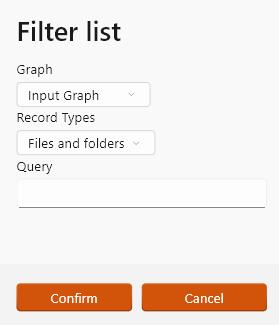
The graph is one of:
- the “Input” graph: i.e. the left-hand section of the workspace pane
- the “Output” graph: the graph of nodes that has been selected for transfer, i.e. the right-hand section of the workspace
- “Removed items”: these are any folders or files that have been removed from the Input graph.
Editing the “Removed items” graph may be useful for documenting the reasons for omitting files from a transfer e.g. for a manifest of deaccessioned files.
You can limit the “Record types” displayed: “Files only”, “Folders only” or “Files and Folders”.
You can also limit the list by query. The queries take the same form as queries from the Analysis pane, e.g.:
- Sizes=<10MB (all files less than 10mb)
- Modified=2026-01 (all files modified in January 2026)
- Extension=jpg (all files with jpg extension)
- Format=x-fmt/263 (all files with PRONOM format x-fmt/263)
- Class=Aggregate (all files with the aggregate PRONOM format class)
- Mime=application/zip (all files with application/zip mime type)